The Iconic Tomato Pincushion: A Sewing Sticker for Crafters
There are few images as deeply embedded in the collective consciousness of the sewing world as the classic red tomato pincushion. It’s a symbol of creativity, patience, and the quiet joy of making something with your own hands. For sewists, quilters, and crafters, it’s more than just a tool—it’s a companion on countless projects. This Tomato Pincushion Sewing Sticker Design captures that nostalgic essence in a clean, modern vector format, offering a versatile asset for a wide range of creative applications.
Visual Style and Instant Appeal
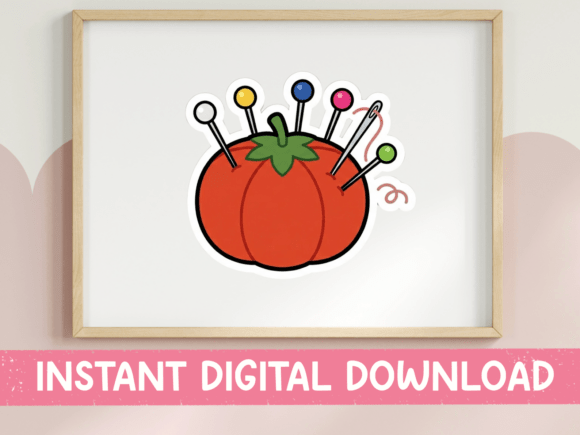
The design presents the familiar tomato shape in a crisp, cartoon line-art style. It’s not overly detailed or photorealistic; instead, it uses clear outlines and bold, flat colors to create an image that is instantly recognizable and charmingly simple. The red body is filled with an array of colorful sewing pins in yellow, pink, blue, white, and red, adding a vibrant, playful touch. A needle with a looping thread tail dangles from the side, a dynamic element that suggests action and ongoing creation. The small green stem leaf on top is the final, essential detail that completes the iconic silhouette.
This particular style—a combination of a clean vector illustration with a familiar subject—gives the design its strength. It feels both professional and approachable. The line art ensures it scales beautifully without losing clarity, a critical feature for any design asset intended for both digital and physical products. The color palette is bright but not overwhelming, making it easy to integrate into various color schemes without clashing.
Practical Applications for Craft and Commerce
The true value of a design like this lies in its adaptability. Because it’s provided as both an SVG and a high-resolution PNG with a transparent background, it slots directly into the workflows of modern crafters and small business owners.
For Personal and Craft Room Projects:
- Stickers and Labels: This is its most direct use. Print it onto sticker paper to decorate planners, laptops, or water bottles. Use it as a custom label for handmade sewing kits or jars of notions.
- Iron-On Patches and Tote Bags: The clean lines and solid colors make it perfect for heat transfer vinyl (HTV) or sublimation. Create a personalized tote for carrying projects to a sewing class or a patch to adorn a craft room apron.
- Craft Room Decor: Frame it as part of a gallery wall, use it as a motif on a custom bulletin board, or incorporate it into DIY wall art. It adds a thematic, professional touch to a dedicated creative space.
For Branding and Commercial Use:
For entrepreneurs and designers in the textile or handmade goods space, this design can become a cornerstone of a brand identity. Its personality is friendly, knowledgeable, and authentic—qualities that resonate deeply with an audience of makers.
- Logo Design: While a full logo might require additional text and composition, the pincushion icon is an excellent starting point or secondary mark for a sewing blog, an Etsy shop selling notions, or a local alteration business.
- Packaging and Marketing: Use it on thank-you cards, business cards, packaging seals, or website headers. It immediately communicates the niche and builds visual consistency across all touchpoints.
- Digital Content: It’s ideal for social media graphics, blog post headers, or YouTube thumbnails related to sewing tutorials, reviews, or craft-along events. Its clear, bold shape remains legible even at smaller sizes.
Design Considerations and Best Practices
Working with a premium font or a detailed illustration is one thing, but a creative font or icon set requires its own approach. Here’s how to evaluate and use this asset effectively.
Evaluate the Project Fit: Ask yourself if the tone of the project aligns with the design’s personality. This Tomato Pincushion Sewing Sticker Design conveys tradition, hands-on skill, and a bit of whimsy. It’s perfect for brands targeting hobbyists, educators, and artisan makers. It might be less suitable for a high-fashion atelier or a minimalist tech brand, where a more abstract or sleek symbol would be needed.
Test Color and Scale: The provided files use specific colors, but in practice, you may need to adjust them. Test the design against your existing color palette. Does the red complement your primary brand color? Do the pin colors work with your background? Always check the design at both the size of a favicon and the size of a tote bag to ensure the lines remain clear and the details distinct.
Pairing with Typography: The design’s line-art style pairs well with a variety of typefaces. For a classic, trustworthy feel, combine it with a clean sans serif font for body text and a slightly decorative serif font for headings. For a more playful, modern craft aesthetic, a handwritten font or a script font can complement its friendly cartoon nature. The key is to let the icon be the focal point and choose typefaces that support, rather than compete with, its character.
Leverage the File Formats:
- SVG: This is your workhorse for precision. It’s infinitely scalable and perfect for use in vector software like Adobe Illustrator or Inkscape. It’s essential for creating cut files for Cricut or Silhouette machines, where clean paths are non-negotiable.
- PNG: The high-resolution, transparent PNG is your go-to for direct insertion into most design software, sublimation printers, and web use. The transparency allows you to place it over any background or integrate it seamlessly into complex layouts.
Remember, this is a digital file. The workflow is immediate: purchase, download, and integrate. There’s no physical product to wait for, making it a perfect solution for fast-paced projects or last-minute design needs. By understanding its visual strengths and practical applications, you can transform this simple, iconic image into a powerful element of your creative toolkit, enhancing everything from personal projects to professional brand assets.